Notifications
How fired alerts reach you — the bell and its inbox on the site, and desktop notifications from your browser.
When a rule fires, TapeHawk records it in your alert inbox. You see it in two places: the bell on the site, and — if you allow it — a desktop notification from your browser.
The bell
The bell sits in the chart toolbar and in the top bar of the site's other pages, for confirmed accounts. These docs have no bell, and neither does the phone layout of the chart; open another page of the site to reach it.
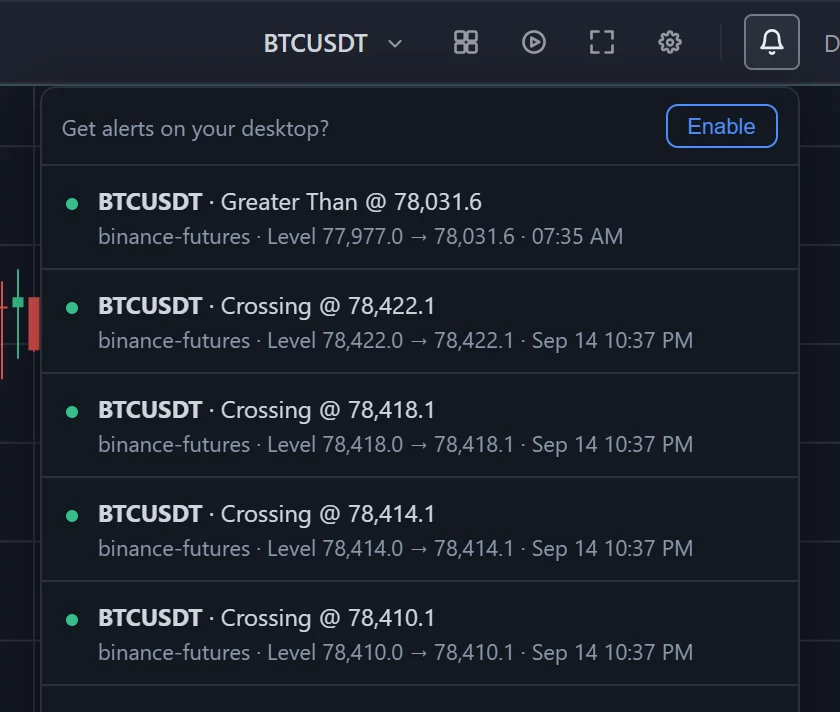
- The badge counts alerts you have not seen yet.
- Click the bell to open the inbox; that marks everything in it as seen.
- Each row shows the symbol and what fired — the condition of a price rule; for a signal, the indicator's own headline, or the indicator and signal names when it writes none — with the price where there is one. The line under it gives the venue, the detail and the time: for a price rule the level it watched and the trade that reached it, for a signal the indicator's own sentence about what happened. A dot on the left is green for the up or buy side and red for the down or sell side; a signal with no side shows green.
- Load older at the foot of the list fetches older alerts.
The inbox is kept on your account for 30 days, so alerts that fired while you were away are there when you come back. Deleting a rule does not remove the alerts it already sent. While a page is open, new ones arrive as they happen. Point at the bell to see whether it is connected: it reads Live, or Reconnecting… and dims while it gets the connection back.
Desktop notifications
Until your browser has been asked, the bell's inbox starts with Get alerts on your desktop? Click Enable and the browser asks you for permission to show notifications.
With permission, every alert that arrives while a page of the site showing the bell is open in your browser also appears as a notification from the browser, with the same wording as its inbox row. TapeHawk does not send notifications to a browser with no such page open, so keep a tab open on the chart, or on another page with the bell, if you want them.
- Nothing appears? The browser may have blocked notifications for the site, or your operating system may be holding them back in a focus or do-not-disturb mode. Allow notifications for the site in the browser's site settings: once you have answered the browser, the bell does not ask again.
- On a phone the browser usually shows none: Safari on iPhone and iPad offers these notifications only to web apps added to the home screen, and Chrome on Android does not let the site show them. The bell still works on the site's other pages.
- Many tabs open? The number of live connections per account is limited, so a tab past it can stay on Reconnecting…. Close the tabs you do not need.
- A notification is not the only copy. Everything it showed stays in the bell's inbox.
Channels
The alert form offers one channel, In-app: the bell and the desktop notifications above.
Signal alerts
Alerts on the signals order-flow indicators draw — which indicators have them, switching one on from the indicator, and building one in the alert form.
Paper trading overview
Simulated trades placed during a bar replay — which panel decides the fills, how a fill is decided, what the simulation leaves out, and what is lost when you leave.