Display settings
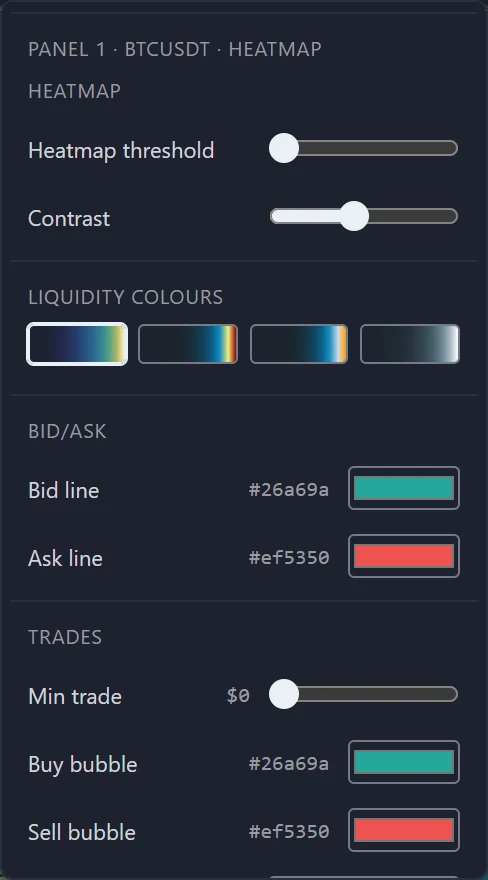
The heatmap settings in the settings popover — threshold, contrast, colour palette, and the colours of the bid and ask trace.
Open Settings (⚙) with a heatmap panel selected. Below the workspace settings, the popover shows the heatmap's own: first Heatmap, then Bid/Ask, then Trades — the last is covered in Trade bubbles.
The colour scale adjusts itself
The heatmap sets the top of its colour scale from the sizes in the field itself, and keeps adjusting it as the market and the range change. A quiet market therefore still shows a full range of colour, and switching from 1m to 4h does not wash the picture out. The two settings below move that scale rather than fixing it.
Heatmap
Heatmap threshold
Hides cells with little resting size. The slider shows no number: at its far left — the default — nothing is hidden, and each step to the right hides cells holding less than one more unit of the symbol (one more coin, for a coin pair). On a low-priced coin a unit is little money, so the slider hides little; on longer ranges a cell covers several prices, so the same setting hides less. It changes only the heat field — not the ladder, the tooltip or the read-outs.
Contrast
Moves the top of the colour scale. Higher contrast lets smaller levels reach the bright colours, so mid-sized liquidity stands out; lower contrast keeps the brightest colours for the very largest levels. This slider shows no number either; at its default, a little left of the middle, the top of the scale sits exactly where the heatmap measured it.
Liquidity colours
The palette the scale climbs through, as four swatches in this order (hover one for its name):
- Classic — the default;
- Bookmap 2;
- Bookmap 1;
- Blue.
Each palette starts from transparent for the smallest sizes, so the grid behind shows through where the book is thin.
Bid/Ask
Bid line and Ask line set the colours of the best-bid and best-ask trace and of its dashed leads to the price axis. The Size column of the order book ladder keeps its own muted green and red.
Which settings belong to what
| Setting | Applies to |
|---|---|
| Threshold, contrast | The selected heatmap panel |
| Minimum trade, bubble grouping, bubble style and size | The selected heatmap panel |
| Palette, bid and ask colours, bubble colours | The whole workspace |
Signed in, all of them are saved with the open layout; the workspace colours are also remembered by the browser. See Colours and settings.
Order book ladder
The live order book beside a heatmap — the live-book band, the price ladder and Size column, and what the book read-outs measure.
Footprint overview
How a footprint panel opens each bar up by price — the bid and ask cells, the POC, the figures around each bar — and what changes as you zoom.