Markets and watchlist
The price table, the watchlist of starred markets, and the toolbar's symbol search — how to find a market, how fresh its price is, and what a missing price means.
Two modules list markets: Markets, which holds every market, and Watchlist, which holds only the ones you starred. Both are the same table. Clicking a row — or moving to it with Tab and pressing Enter — makes that market the selected market for the whole Terminal.
The price table
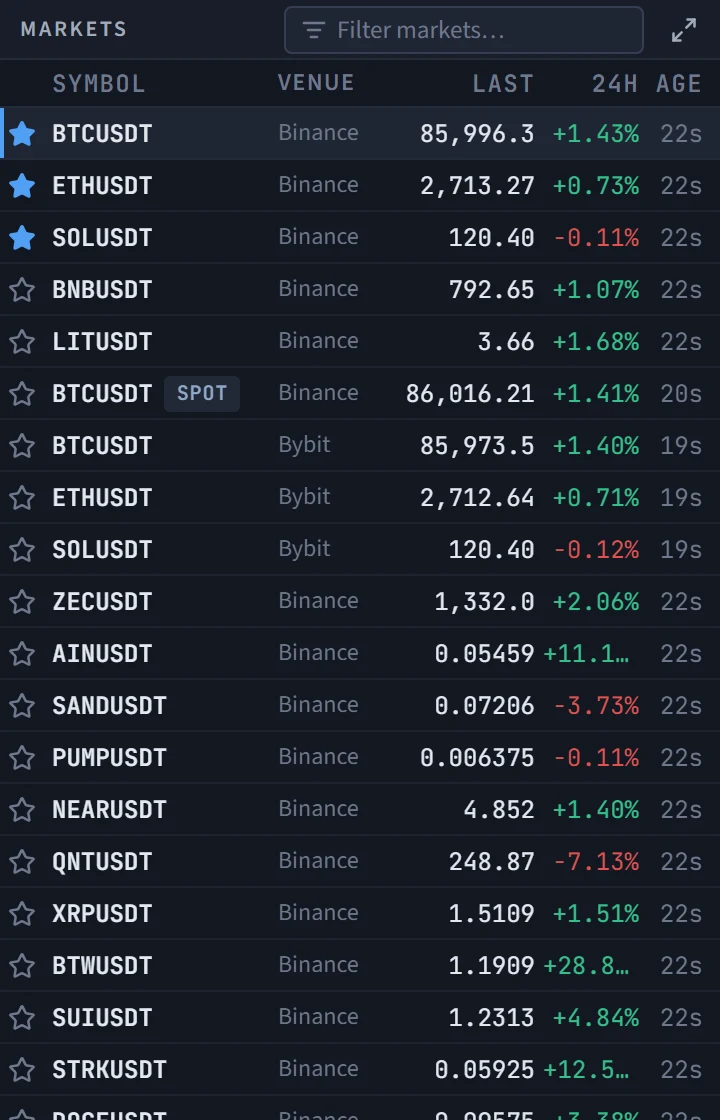
Every market in the instrument list is a row, on every venue the chart offers — the list the chart's symbol box reads. Each row starts with a star button (see Stars and the watchlist), then:
| Column | What it shows |
|---|---|
| Symbol | The symbol. A spot market carries a small SPOT tag |
| Venue | The exchange |
| Last | The last price |
| 24h | The change over the last 24 hours, green or red in the colours you set on the chart |
| Age | How long ago that price was published |
Prices are fetched every 30 seconds while the tab is visible. When a price changes, its cell flashes green or red for a moment; the first price a row ever receives does not flash, so opening the table does not light up every cell.
Sorting and filtering
Click a column heading to sort. Symbol and Venue sort ascending, then go back to the default order on the next click. Last and 24h sort largest first, then smallest first, then back to the default. The default order is the instrument list's own, which puts the markets TapeHawk records in full first.
Starred markets always stay at the top, whatever the sort. A market with no price is placed after every market that has one, in either direction — a missing price is not a small number.
The filter box in the title bar narrows the table to rows whose symbol or venue contains what you type, ignoring case.
A missing or late price
The table is built from the instrument list, not from the prices that arrived, so a market does not vanish when its price does:
- A dash (—) in the price cell means no price was published for that market in the last 90 seconds. Point at it for the same explanation.
- Age switching to the warning colour means the last publish is more than a minute old, and pointing at it says how old exactly. A price like this is real but late.
- If the price request is refused or fails, the table keeps the last prices it had and shows a Delayed banner with the time of the last good update, and the Prices pill in the status bar turns to delayed. If the answer comes back with no price for any market, the pill says down: nothing is publishing.
Stars and the watchlist
The star at the start of each row is dim until the market is starred, then filled in the accent blue. Click it to star the market, and click again to remove the star; clicking the star does not change the selected market. Starring needs a signed-in account: for a visitor the star is faded, and pointing at it says to sign in.
The stars are the same favourites as the chart's favourites tab — a market starred here is starred on the chart sidebar, and the other way round. There is one list per account, with the same size limit (see Access levels); when it is full the table says so and the star is not added.
Starring does two things:
- the market moves to the top of Markets;
- it appears in Watchlist, the module of the Focus layout, which lists only starred markets. A visitor sees a link to sign in; with nothing starred it says so and points at the table.
The watchlist is for switching: beside one large chart, a click on a row changes what the chart shows.
The symbol search
The box in the toolbar finds a market without scrolling the table. Press / anywhere on the page to put the cursor in it — except when you are typing in another field, where a slash stays a slash.
- Type part of a symbol. Matches that start with what you typed come first, then matches that contain it; at most 20 rows are listed, so type more to reach the rest.
- Each row names the symbol and its venue, because the same symbol on two venues has two different order books.
- Click a row, or press Enter to take the first one. A symbol that is not in the instrument list cannot be selected, and the box says no symbol matches.
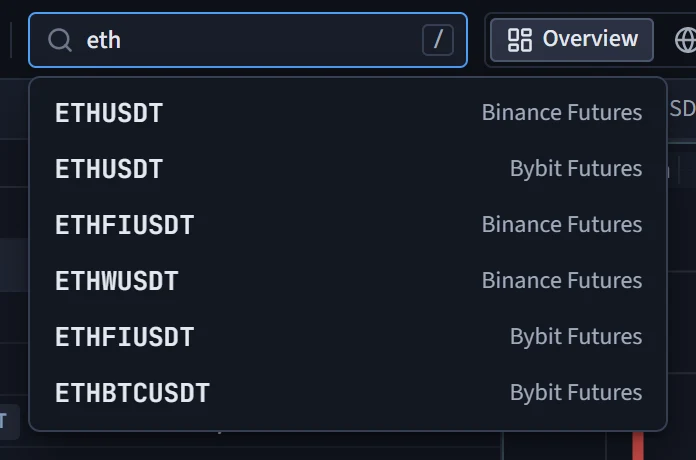
The list is the one the table uses. If it could not be loaded, the box offers to retry.
Terminal overview
The Terminal page — one dense screen with prices, the order-flow chart, fired signals, macro series, news, your portfolio and two AI tools — its five layouts, what each access level sees, and how to read the status bar.
Chart module
The order-flow chart inside the Terminal — what it shows, which chart types it can switch between, what it leaves out compared with the full chart, and how to open the full chart on the same market.