Feed
Your alerts, the signals fired across every market, and new market recaps on one timeline — how it is ordered, how to filter it, and what it says when the signal engine is down.
The Feed module is one timeline of three kinds of event, newest first, with the time of each in UTC. It sits beside the chart in the Overview layout, so what fires is next to the market it fired on.
| Kind | What it is | Who sees it |
|---|---|---|
| Alerts | Alerts from your own rules, as they arrive in the bell | Confirmed accounts |
| Signals | Signals the order-flow indicators fired on any market | Confirmed accounts |
| Recaps | The market recaps TapeHawk publishes on the blog | Everyone |
A visitor or an account whose email is not confirmed sees the recaps and a link to sign in for the rest.
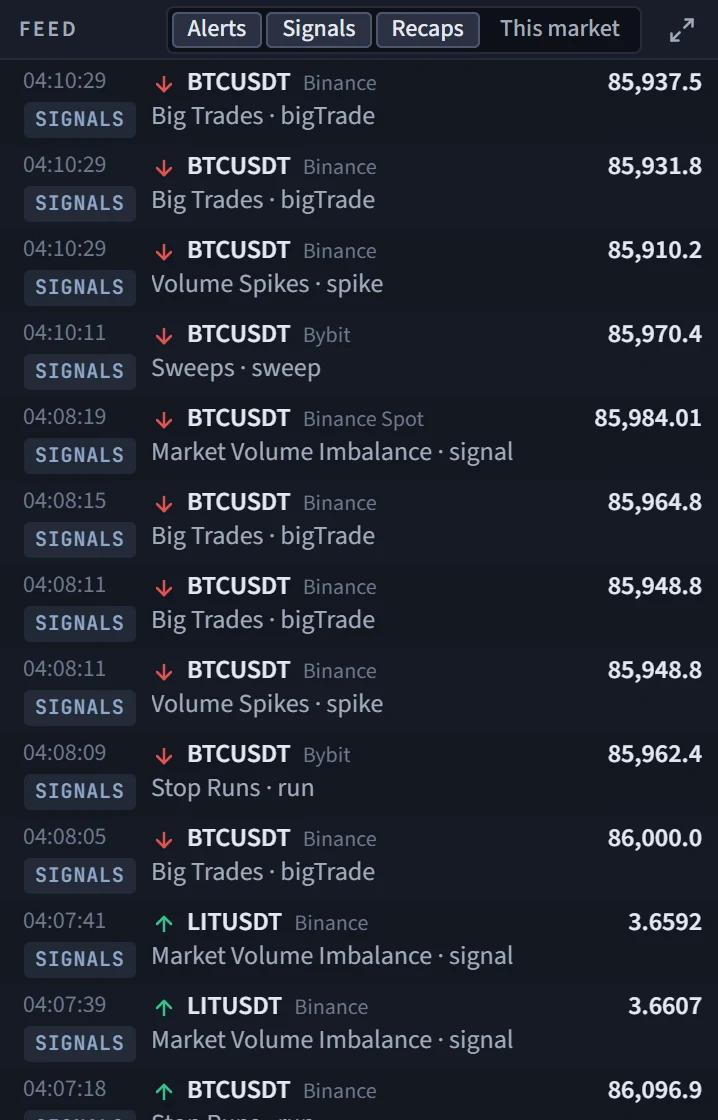
Reading a row
- An alert shows its market, the venue and the alert's own title. They are the alerts of your rules, the same events that appear in the bell and the alert inbox. The newest ones are listed the moment they arrive; the feed starts from the first page of your inbox.
- A signal shows an arrow for its side — buy side or sell side — then the market, the venue, the price it fired at, and underneath the indicator and the name of the signal, for example one of the Sweeps or Absorptions. Signals are the last day's marks of the built-in indicators at their default settings, from markets TapeHawk lists. A mark that was held back, or whose price does not fit the market's own price at that minute, is not shown.
- A recap shows its title and opens the post on the blog in a new tab.
Clicking an alert or a signal selects its market for the whole Terminal — the chart jumps to it. A signal is placed on the timeline by the time it was recorded, which is when you could first have seen it, not the moment on the chart it is about; a signal about something a few minutes back therefore does not sink below the ones that came after.
Signals refresh every 30 seconds and recaps every 10 minutes, the latest ten recaps each time. The feed keeps the latest 200 events.
Filters
The title bar has four toggles:
- Alerts, Signals and Recaps switch each kind on or off; all three start on.
- This market limits alerts and signals to the selected market. Recaps stay listed, because a recap covers every market.
When the filters leave nothing, the module says the feed is empty and that events appear as they happen.
When the signal engine is down
Signals are written by a signal engine on TapeHawk's servers. An empty feed under a stopped engine would read as a quiet market, so the module says it in a banner: the signal engine is not running, with the time it last wrote, and that no new signals come until it is back. The Signals pill in the status bar turns to down at the same time.
If the signals request is refused or fails, the feed keeps what it has and a note says the signals are delayed since the last good update.
Chart module
The order-flow chart inside the Terminal — what it shows, which chart types it can switch between, what it leaves out compared with the full chart, and how to open the full chart on the same market.
Macro
Nineteen free macro series from FRED, the World Bank and the IMF — what each column means, how to read a series' history, the forecast and late tags, and the release calendar.