Sweeps
A mark on the heatmap where one aggressive order pushed a large amount of size through several price levels in a single motion.
One aggressive order that pushed a large amount of size through several price levels in a single motion, before anything came back the other way.
- Heatmap
- any range
- Alerts
- yes
What it shows
A chevron on the heatmap wherever one aggressive order swept the book: trades on one side, following each other without a pause and without price stepping back, that went through several price levels and carried a large amount of size. That is the trace of a single participant clearing the offers (or the bids) in front of them.
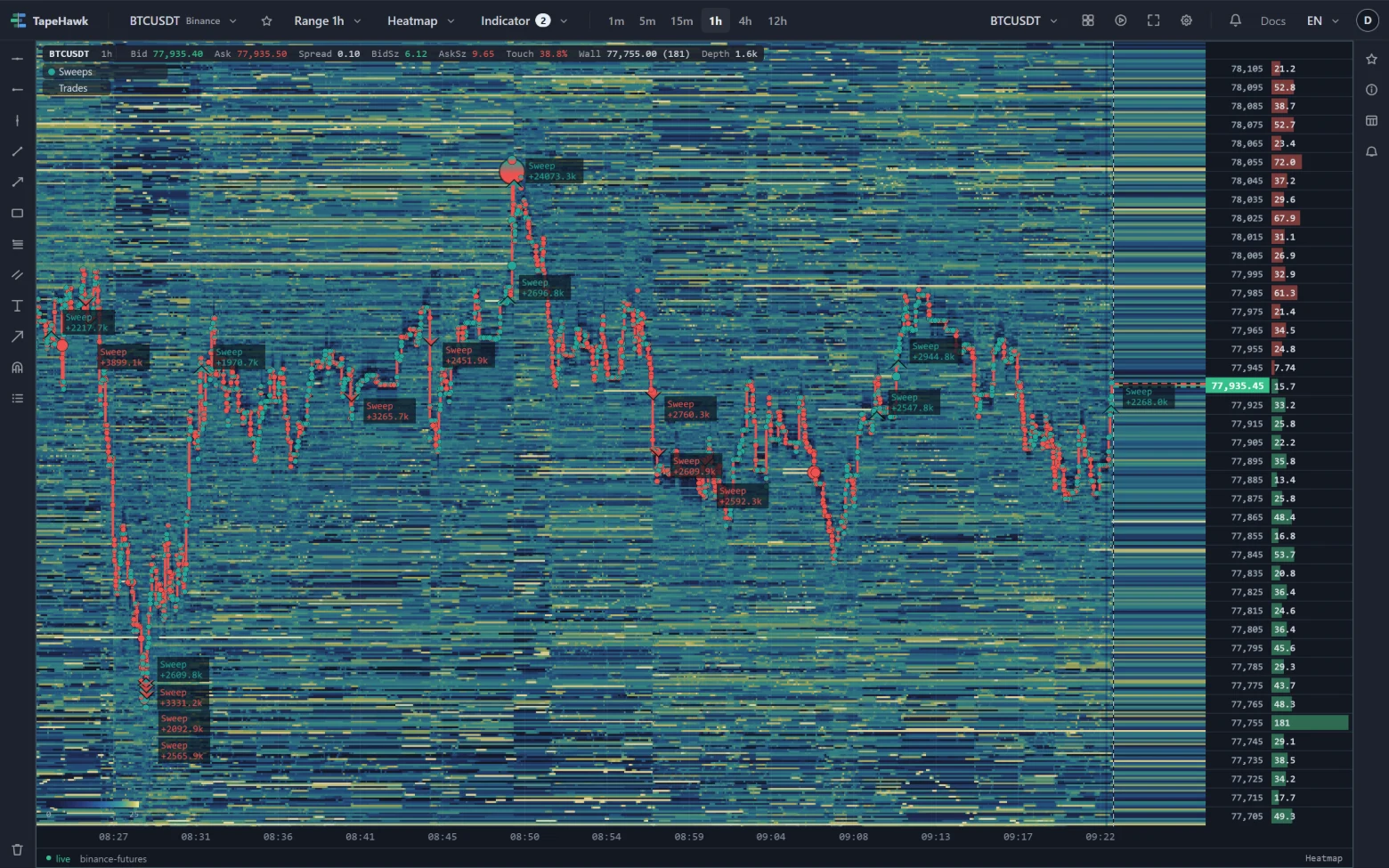
The chevron is placed at the moment the sweep began and at the price it reached. It points up, from below, in the buying colour for a sweep that bought through the offers; down, from above, in the selling colour for one that sold through the bids. The plate prints the size the sweep carried, in the quote currency. Figures, tooltip, held marks and history work as for every mark on the heatmap.
How to read it
- Urgency. Someone paid through several levels at once rather than waiting. Sweeps cluster around breakouts, stop levels and news.
- Where it ends matters: the price a sweep reached is the level the book was pushed to. Price that holds beyond it confirms the push; price that snaps back says the sweep ran out.
- Into a wall. A sweep ending at a bright band on the heatmap ran into resting size; one ending in thin liquidity simply cleared the way.
- A string of smaller orders pushing the same way is a different pattern — Stop Runs marks that one.
Parameters
| Setting | Control | What it does |
|---|---|---|
| Trigger volume (M) | Number | Range and default are set by TapeHawk; the settings dialog shows them. |
| Price range (levels) | Number | Range and default are set by TapeHawk; the settings dialog shows them. |
| Gap (ms) | Number | Range and default are set by TapeHawk; the settings dialog shows them. |
| Trigger volume max (M) | Number | Range and default are set by TapeHawk; the settings dialog shows them. |
| Hold back marks the flow contradicts | On / off | The default is set by TapeHawk. |
| Hide held marks | On / off | A held mark is one this indicator decided not to assert: it is drawn as an outline with no label and sends no alert. The outline is there so you can judge the filter rather than trust it — you see the sweeps it held back. Turn this on once you are satisfied and the outlines go; nothing is deleted, and turning it off puts every one of them back in the same frame. |
| Max marks / minute | Number | At most this many marks in any one minute, so a burst stays readable — and since 02/09 the same number is the ceiling on how often an alert rule on this signal may reach you. A rule takes THIS DEFAULT and keeps it: turning the knob on a panel changes the drawing only, because this knob is a DISPLAY setting and a rule inherits only what changes the numbers. The two can still differ at the edge of a busy minute, and the difference is deliberate: an alert is decided as each mark arrives and cannot be unsent, while the chart redraws the whole minute and lets a mark that was back-dated into it take a slot. Measured over 30 days of stored marks, this default is exceeded in 3.0% of the minutes that had a sweep at all — the mildest of the three (10.9% for absorption, 21.2% for stop hunts). 1–30 · default 5 |
| Buying colour | Colour | |
| Selling colour | Colour |
Trigger volume (M) is how much size the sweep must carry, in millions of the quote currency. It is an absolute amount and its default is set for BTCUSDT: on a smaller symbol lower it, or sweeps will hardly ever mark. Trigger volume max (M) can optionally ignore sweeps above a size, to single out a band of sizes; left at its lowest it ignores none.
Price range (levels) is how many distinct price levels the sweep must cross. Levels are counted in the exchange's price steps, which are a different size on every symbol. Gap (ms) is how long a pause ends the order: trades closer together than that count as the same sweep.
Hold back marks the flow contradicts holds back a sweep when the recent order flow leans against the direction it pushed; see held marks.
Alerts
The Alert tab has one signal, sweep. Switch it on and TapeHawk tells you when a sweep
marks on this symbol, with its size, the price it reached and its side. The alert uses the settings on the Parameters
tab at the moment you switch it on; if you change them later, the tab offers to bring the alert along. Held marks send
no alert, and an alert reaches you at most as often as the default Max marks / minute allows.
Alerts need a confirmed account; Signal alerts covers the rest.
Limitations
- The exchange does not say which trades belong to one order; a sweep is inferred from trades that follow each other on one side without a pause or a step back.
- The mark arrives once the sweep has ended, a moment after the time it is placed at.
- It is drawn on heatmap panels only, so only on symbols TapeHawk records, and it reaches back 24 hours.
- The size is an absolute amount, so one setting does not fit every symbol.
Absorptions
A mark on the heatmap where a large amount of aggressive size piled up while price stayed pinned in a narrow band — and then the band gave way.
Stop Runs
A mark on the heatmap where several aggressive orders in a row pushed the same way, each starting where the last one stopped — the shape a cascade of stops leaves.