What is order book imbalance?
Order book imbalance compares the size resting on the bid and the ask near the current price — resting demand against resting supply.
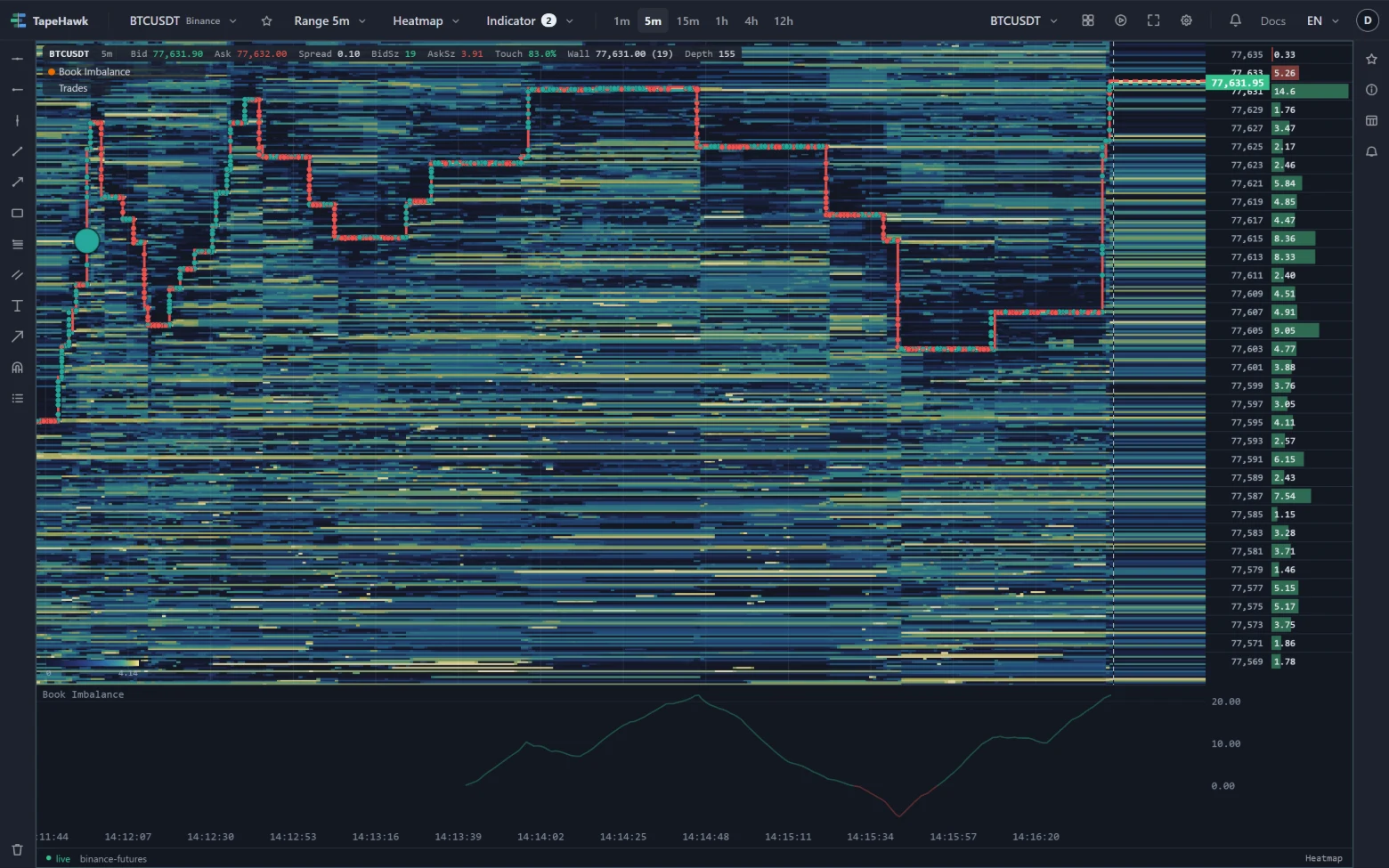
Order book imbalance compares the size resting on the two sides of the book near the current price: how much is waiting to buy below price against how much is waiting to sell above it. A heavy bid is resting demand; a heavy ask is resting supply. It describes intent that has not traded yet, which makes it both useful and easy to fake.
What it looks like on the chart
Under the five-minute BTCUSDT heatmap above, the Book Imbalance band tracks the tilt as a smoothed percentage: above zero more size rests on the bid, below zero more on the ask. The band starts empty on the left, because it begins when the panel opens. It then climbs to about 20 near 14:14:48 as bids stacked up under price, falls through zero to a small negative reading near 14:15:45 as the book leaned to the ask, and climbs back to about 20 by the right edge. The info bar at that moment reads Touch 83.0% — 83% of the size at the best bid and ask sits on the bid.
How traders read it
- The line says which side is thicker, not which side is trading. Pair it with the trades.
- Watch the heavy side as price arrives. A wall of bids that is still there when price reaches it can hold; one that disappears was never meant to be filled.
- A flip from one side to the other often comes before price turns — or shows resting size getting out of the way.
- Resting orders can be cancelled at any moment, so a heavy side is a picture of intent, not a commitment.
On TapeHawk
The Book Imbalance indicator draws the smoothed tilt in a band under the heatmap, marks a triangle when it passes the trigger level on either side and a circle when it flips sides and carries on. It is worked out in your browser from the live order book, so it starts when the panel opens and a reload starts it again; it cannot see a wall that lives for less than one book update. It is drawn on heatmap panels of the symbols TapeHawk records.